Per the EU's GDPR and ePrivacy Directive, you must ask visitors to a website for their consent before setting any cookies, and/or before collecting any user tracking data. And because the GDPR applies to all EU citizens (who are residing within the EU), regardless of where in the world a website or its owner is based, in order to fully comply, in practice you should seek consent for all visitors to all websites globally.
In order to be GDPR-compliant, and in order to just be a good netizen, I made sure, when building GreenAsh v5 earlier this year, to not use services that set cookies at all, wherever possible. In previous iterations of GreenAsh, I used Google Analytics, which (like basically all Google services) is a notorious GDPR offender; this time around, I instead used Cloudflare Web Analytics, which is a good enough replacement for my modest needs, and which ticks all the privacy boxes.
However, on pages with forms at least, I still need Google reCAPTCHA. I'd like to instead use the privacy-conscious hCaptcha, but Netlify Forms only supports reCAPTCHA, so I'm stuck with it for now. Here's how I seek the user's consent before loading reCAPTCHA.
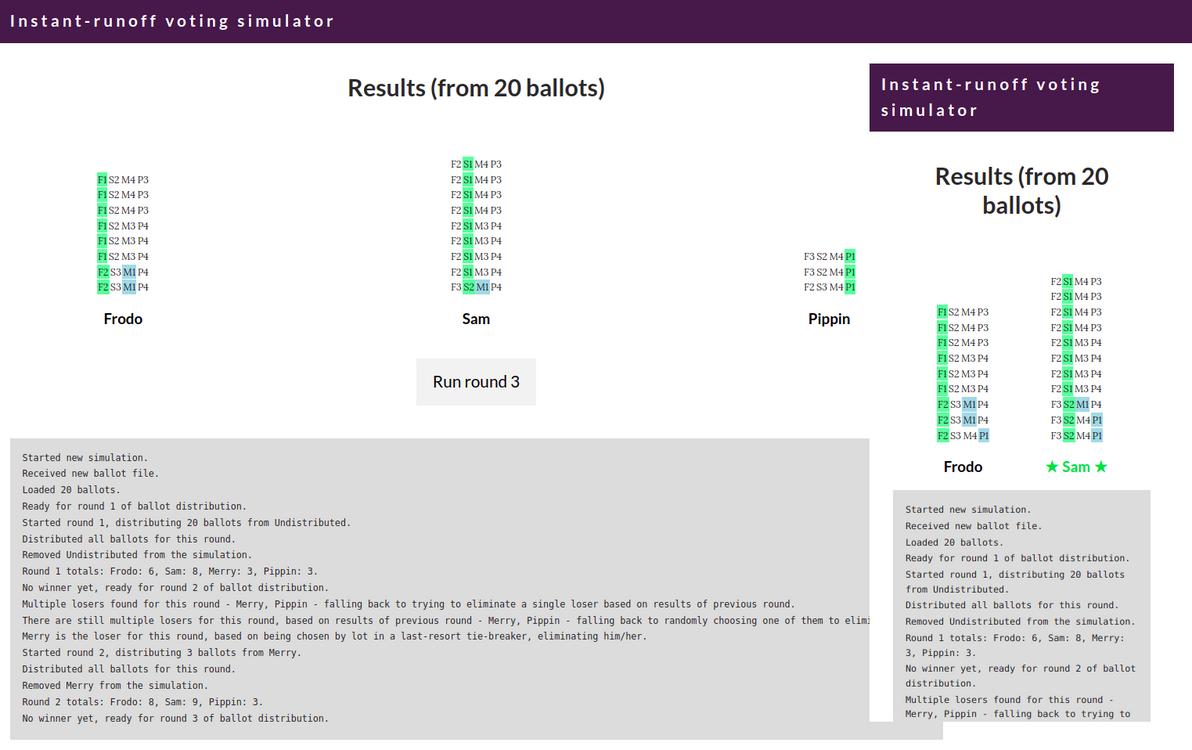
I built a simulator showing how instant-runoff voting (called preferential voting in Australia) works step-by-step. Try it now.
The simulator in action
I hope that, by being an interactive, animated, round-by-round visualisation of the ballot distribution process, this simulation gives you a deeper understanding of how instant-runoff voting works.
Continuing my foray into the world of Static Site Generators (SSGs), this time I decided to try out one that's quite different: TinaCMS (although Tina itself isn't actually an SSG, it's just an editing toolkit; so, strictly speaking, the SSG that I took for a spin is Next.js). Shiny new toys. The latest and greatest that the JAMstack has to offer. Very much all alpha (I encountered quite a few bugs, and there are still some important features missing entirely). But wow, it really does let you have your cake and eat it too: a fast, dumb, static site when logged out, that transforms into a rich, Git-backed, inline CMS when logged in!
Following on from my last experiment with Hugo, I decided to dabble in a different static site generator (SSG). This time, Eleventy. I've rebuilt another one of my golden oldies, Jaza's World, using it. And, similarly, source code is up on GitHub, and the site is hosted on Netlify. I'm pleased to say that Eleventy delivered in the areas where Hugo disappointed me most, although there were things about Hugo that I missed.
After having it on my to-do list for several years, I finally got around to trying out a static site generator (SSG). In particular, Hugo. I decided to take Hugo for a spin, by rebuilding one of my golden oldies, Jaza's World Trip, with it. And, for bonus points, I published the source code on GitHub, and I deployed the site on Netlify. Hugo is great software with a great community, however it didn't quite live up to my expectations.
I've created a new online home for my formidable collection of 25,000 personal photos. They now all live in an S3 bucket, and are viewable in a private gallery powered by the open-source AWSPics. In general, I'm happy with the new setup.
Theories abound regarding what makes a good dev. These theories generally revolve around one or more particular skills (both "hard" and "soft"), and levels of proficiency in said skills, that are "must-have" in order for a person to be a good dev. I disagree with said theories. I think that there's only one thing that makes a good dev, and it's not a skill at all. It's an attitude. A good dev cares about code.
There are many aspects of code that you can care about. Formatting. Modularity. Meaningful naming. Performance. Security. Test coverage. And many more. Even if you care about just one of these, then: (a) I salute you, for you are a good dev; and (b) that means that you're passionate about code, which in turn means that you'll care about more aspects of code as you grow and mature, which in turn means that you'll develop more of them there skills, as a natural side effect. The fact that you care, however, is the foundation of it all.
I recently built a little web app called What If Stocks, to answer the question: based on a start and end date, and a pool of stocks and historical prices, what would have been the best stocks to invest in? This app isn't rocket science, it just ranks the stocks based on one simple metric: change in price during the selected period.
I imported into this app, price data from 2000 to 2018, for all ASX (Australian Securities Exchange) stocks that have existed for roughly the whole of that period. I then examined the results, for all possible 5-year and 10-year periods within that date range. I'd therefore like to share with you, what this app calculated to be the 12 Aussie stocks that have ranked No. 1, in terms of market price increase, for one or more of those periods.
As a computer programmer – i.e. as someone whose day job is to write relatively dumb, straight-forward code, that controls relatively dumb, straight-forward machines – DNA is a fascinating thing. Other coders agree. It has been called the code of life, and rightly so: the DNA that makes up a given organism's genome, is the set of instructions responsible for virtually everything about how that organism grows, survives, behaves, reproduces, and ultimately dies in this universe.
Most intriguing and most tantalising of all, is the fact that we humans still have virtually no idea how to interpret DNA in any meaningful way. It's only since 1953 that we've understood what DNA even is; and it's only since 2001 that we've been able to extract and to gaze upon instances of the complete human genome.
As others have pointed out, the reason why we haven't had much luck in reading DNA, is because (in computer science parlance) it's not high-level source code, it's machine code (or, to be more precise, it's bytecode). So, DNA, which is sequences of base-4 digits, grouped into (most commonly) 3-digit "words" (known as "codons"), is no more easily decipherable than binary, which is sequences of base-2 digits, grouped into (for example) 8-digit "words" (known as "bytes"). And as anyone who has ever read or written binary (in binary, octal, or hex form, however you want to skin that cat) can attest, it's hard!
In this musing, I'm going to compare genetic code and computer code. I am in no way qualified to write about this topic (particularly about the biology side), but it's fun, and I'm reckless, and this is my blog so for better or for worse nobody can stop me.
The premise: each time a certain API method is called within a Flask / SQLAlchemy app (a method that primarily involves saving something to the database), send various notifications, e.g. log to the standard logger, and send an email to site admins. However, the way the API works, is that several different methods can be forced to run in a single DB transaction, by specifying that SQLAlchemy only perform a commit when the last method is called. Ideally, no notifications should actually get triggered until the DB transaction has been successfully committed; and when the commit has finished, the notifications should trigger in the order that the API methods were called.
There are various possible solutions that can accomplish this, for example: a celery task queue, an event scheduler, and a synchronised / threaded queue. However, those are all fairly heavy solutions to this problem, because we only need a queue that runs inside one thread, and that lives for the duration of a single DB transaction (and therefore also only for a single request).
To solve this problem, I implemented a very lightweight function queue, where each queue is a deque instance, that lives inside flask.g, and that is therefore available for the duration of a given request context (or app context).